The platform
One hospital. One operating system.
Every module below is in production today, and each can be taken on its own. This page answers “does it cover us?” — the argument for why is on the homepage.
Nexus
OneHealth
- One patient record
- One workflow
- One financial picture
01
Patient & clinical care
One record from the first registration to the last follow-up, with everything clinical hanging off it.
Patient management
OPD and IPD registration, automatic MRN generation, duplicate detection and record merging, and full longitudinal history.Appointments & queue
Doctor schedules with exceptions, token-based queue management, and both list and token views for the front desk.Clinical documentation
Encounters, configurable vitals, prescriptions, structured notes and casesheet uploads — with medical symbol shortcuts in every field.Bed management
Real-time bed board across facility, building, floor, ward, room and bed, with live occupancy and cleaning status.Discharge summaries
Structured discharge workflow producing print-ready PDFs on your hospital letterhead, including transfer and shift-out forms.
02
Diagnostics
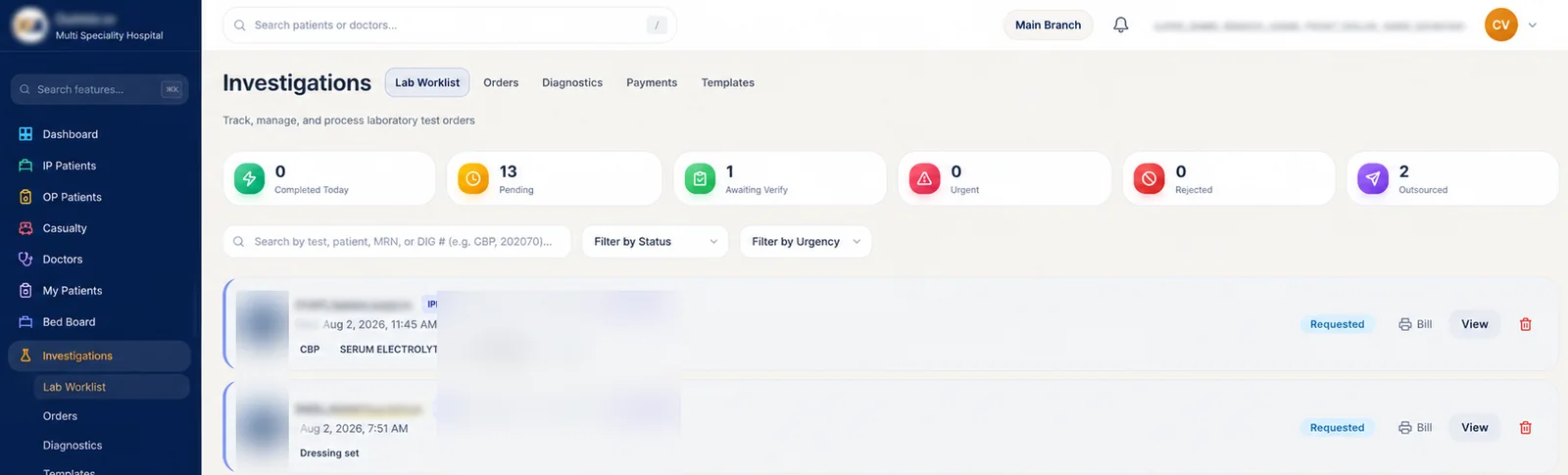
Order to result to release — including the studies you send outside and read back in the same worklist.
Orders & investigations
Lab, radiology and procedure orders with a technician worklist, result entry, file attachment and full status tracking.DICOM imaging
Cornerstone-based viewer integrated with an Orthanc DICOM server, including 3D reconstruction for cross-sectional studies.Outsourced testing
Investigations sent to an outside laboratory come back into the same worklist, counted alongside those processed in-house.
Whatever you keep, we integrate with.
Taking one module does not orphan the rest of your estate. If you already have a lab system you are happy with, keep it.
- Investigations sent to an outside lab return into the same worklist
- Lab, pharmacy and billing exchange data with systems you keep
- One department can move without forcing the others
- We migrate the data at our cost, and you can stop at any point
03
Pharmacy & inventory
Two counters, two stocks, one drug master — and stock movements that reconcile with what was charged.
Pharmacy
Separate IP dispensing and OP counter-sale POS, each with its own stock and inventory, ward indents and a shared drug master.Stock & inventory
Issue, indent and adjustment history per item, with price and quantity changes attributable to the user who made them.
04
Revenue cycle
Charge master to settlement, with the system checking its own output on the way through.
Billing & revenue
Charge master, invoices, payments, deposits and refunds, with editable investigation pricing and audited discount remarks.Revenue Integrity
Eleven rules running continuously across admissions, orders, theatre, pharmacy stock, billing changes and insurance settlements.
05
Patient engagement
The patients who should have come back, found daily and contacted on the channel they actually read.
Care gaps
Overdue chronic reviews, unbooked post-procedure follow-ups, un-actioned results and missed appointments, detected daily.CRM & engagement
Follow-up tracking, appointment reminders, no-show capture and patient communication with reusable templates.WhatsApp built in
Reports, bills, reminders and recall campaigns go out over WhatsApp from inside the platform — at a fraction of the cost of SMS.
06
Hospital intelligence
The numbers management already asks for, in the format they already use.
Revenue reports
Income broken out by IP, OP and pharmacy against expense, over any period — with the daily, monthly and quarterly views management actually reviews.Reports, built to your format
Admissions, occupancy, department mix, doctor workload and collections. If the report your management wants is not here, we build it rather than asking you to export to Excel.AI Insights — built around you
Not a fixed dashboard. We configure the insights module to the questions your management actually asks, and extend it as those questions change.Multi-branch roll-up
Revenue, admissions, occupancy and leakage roll up across every branch into one top-level picture, with the ability to drop into any single site.
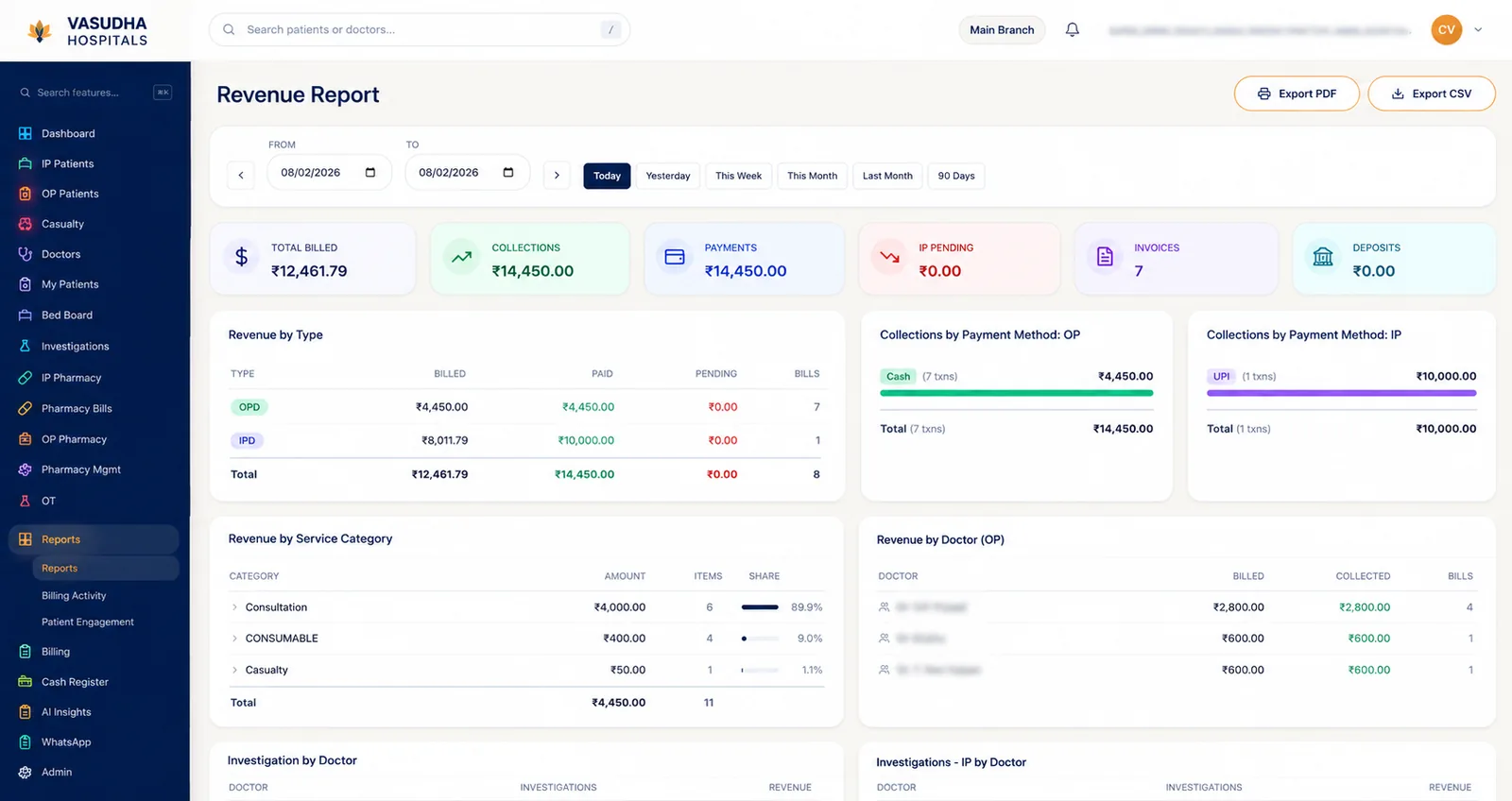
The revenue report your management already asks for.
Billed against collected against pending, for any period — split by OPD and IPD, by payment method, by service category and by doctor.
- Today, yesterday, week, month or any custom date range
- Collections split by cash, UPI, card and bank transfer
- Revenue attributed by doctor, for consultation and investigations
- Exportable to PDF or CSV — and if the report you need is not here, we build it
07
Operations & control
Who did what, who can see what, and how fast anyone can find anything.
Roles & granular permissions
Access set per staff member, not per department. 13 roles and 47+ individual permissions decide exactly what each person can see, edit, print or export — with branch-scoped data and controlled cross-branch access.Staff attendance
Attendance integrates with the platform, so duty records sit against the same staff accounts used everywhere else — one source for who was on shift.Search everywhere
Patients by name, MRN, ABHA number or phone from any screen. Bills by invoice or bill number. A command palette that jumps to any module by name.
Multi-branch
Run every site from one system.
Groups running more than one hospital usually end up with one system per site and a spreadsheet stitching them together. This is a single deployment that already knows about all of them.
- One combined view for management
- Revenue, admissions, occupancy and leakage roll up across every branch, so nobody is reconciling separate reports from each site.
- Switch into any branch
- Drop into an individual hospital and see it exactly as its own staff do — same screens, same numbers, no separate login.
- Each branch sees only its own
- Data is scoped per branch by default. Cross-branch visibility is granted deliberately and logged like any other access.
- Pricing set per branch
- Charge master and tariffs are configured per site, so a group running hospitals at different price points does not compromise on one shared list.
- Staff who work across sites
- Doctors and administrators get access to more than one branch without duplicate accounts, and stay attributable in each.
- Adding a branch is configuration
- A new site does not mean a new deployment, a new database or a contract renegotiated from scratch.
Take one module, or take the platform.
Tell us which department hurts most today. That is usually the right place to start, and it is the one we will show you first.